Whether installed directly on the production line or fully integrated into your machine: Choose the REA JET controller that best meets your operational and integration needs. The REA JET TITAN Platform serves as the common foundation.

A Comparison of Three Controllers. Your Needs Determine the Choice.
Physical controls, touchscreen, or external web interface: Find the right way to access your marking system.

For operation directly on the production line: a rotary pushbutton, number pad, and cursor keys allow for input via physical controls.
- Display: 5.7 inches
- Operation: Rotary push button
- Supported coding and marking technologies: drop-on-demand (DOD), thermal inkjet (TIJ), piezo inkjet (PIJ), Spray Mark (ST)
- Protection rating: IP65

Control your coding and marking system using a large touchscreen. The tile-based interface is customizable and can be operated even while wearing gloves.
- Touchscreen: 10.1 inches
- Operation: Touchscreen
- Supported coding and marking technologies: drop-on-demand (DOD), thermal inkjet (TIJ), piezo inkjet (PIJ), Spray Mark (ST)
- Protection rating: IP65

Designed for installation in a control cabinet. Configuration and operation are performed via the TITAN 2.0 WebGUI on a compatible external control device on the same network.
- Operation: WebGUI
- Models: 2K, 4K, 6K
- Supported coding and marking technologies: drop-on-demand (DOD), thermal inkjet (TIJ), piezo inkjet (PIJ), spray mark (ST)
- Weight: approx. 2 kg
The Right Control Concept for Every Production Environment
Whether in the harsh production environment of a steel mill, on modern production lines, or fully integrated into a machine: The requirements for operating and integrating coding and marking systems are versatile. REA JET offers the right control concept for a variety of operating conditions.

In a steel mill, marking technology has to be reliable even under harsh industrial conditions.
Thanks to its physical buttons and rotary pushbutton, the rugged Universal Controller allows for convenient operation right on the production line—even while wearing work gloves.

On modern manufacturing and packaging lines, intuitive operation and a clear display of relevant information are key priorities.
With its spacious 10.1-inch touchscreen, the Universal Touch Controller provides convenient access to print jobs, system settings, and status information.

For machine builders who want to fully integrate coding and marking systems into their machine architecture, the OEM Controller 2.0 offers a particularly compact solution.
Installed directly in the control cabinet, the controller can be incorporated into the machine design in a space-saving manner. Configuration and operation are carried out via the REA JET TITAN 2.0 WebGUI.
REA JET TITAN as a unified operating platform—Easy to learn. Versatile.
TITAN integrates REA JET coding and marking technologies through a common operating logic. Familiar workflows make it easier to switch between systems and can reduce the time needed for training.
The controller determines where and how you operate the system. TITAN provides the cross-technology operating concept.
- Uniform operation: A recognizable operating logic across various REA JET Systems.
- Flexible access: Local operation, browser access, and VNC remote maintenance as platform options.
- System integration: xml based communication supports integration with higher-level systems.
- Design content: Multilingual print content, TrueType fonts, and a realistic print preview.

Guide at a Glance
Which controller is right
for your application?
Compare operating concepts and integration options. We’ll then examine your labeling task to determine the technical specifications.
| Characteristic | Universal Controller | Universal Touch Controller | OEM Controller 2.0 | ||||
|---|---|---|---|---|---|---|---|
| Characteristic | operating concept | Universal Controller | Rotary push button and buttons | Universal Touch Controller | Touchscreen | OEM Controller 2.0 | External TITAN 2.0 WebGUI |
| Characteristic | Control Display | Universal Controller | 5.7 inches, built-in | Universal Touch Controller | 10.1 inches, built-in | OEM Controller 2.0 | External control unit required |
| Characteristic | Typical Applications / Suitable for | Universal Controller | Direct operation on the production line | Universal Touch Controller | Touchscreen controls on the production line | OEM Controller 2.0 | Control cabinet and Machine Integration |
| Characteristic | Installation Location | Universal Controller | Right on the line; space for controllers and accessibility required | Universal Touch Controller | Right on the line; space required for a touchscreen and accessibility | OEM Controller 2.0 | In the control cabinet or inside the machine |
| Characteristic | Supported coding and marking technologies | Universal Controller | Drop-on-Demand (DOD), Thermal Inkjet (TIJ), Piezo Inkjet (PIJ), Spray Mark Technology (ST) | Universal Touch Controller | Drop-on-Demand (DOD), thermal inkjet (TIJ), piezo inkjet (PIJ), Spray Mark Technology (ST) | OEM Controller 2.0 | Drop-on-Demand (DOD), Thermal Inkjet (TIJ), Piezo Inkjet (PIJ), Spray Mark Technology (ST) |
| Characteristic | Print heads by technology: HR 2.0, HR-NX, GK 2.0, UP | Universal Controller | 2 | Universal Touch Controller | 4 | OEM Controller 2.0 | 2, 4, 6, depending on the model |
| Characteristic | Nozzles per technology: DOD 2.0, ST | Universal Controller | 512 | Universal Touch Controller | 1,024 | OEM Controller 2.0 | 1,536 |
| Characteristic | Weight | Universal Controller | Approx. 3.9 kg | Universal Touch Controller | Approx. 6.0 kg | OEM Controller 2.0 | Approx. 2.0 kg |
| Characteristic | Shared Platform | Universal Controller | REA JET TITAN | Universal Touch Controller | REA JET TITAN | OEM Controller 2.0 | REA JET TITAN |
| Characteristic | Things to Consider When Choosing | Universal Controller | Space for the control panel and accessibility | Universal Touch Controller | Space for a touchscreen and accessibility | OEM Controller 2.0 | Control Unit, Network, Installation Requirements, and Port Options |
Universal Controller: the ideal choice for rugged operation via buttons and a rotary knob right on the production line.
Universal Touch Controller: Suitable for convenient, touch-based operation with a large display.
OEM Controller 2.0: Designed for integration into machines and control cabinets, as well as for operation via a web interface.
Downloads for REA JET Controllers and TITAN
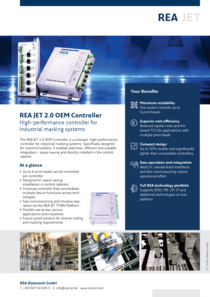
High-Performance Controller for Industrial Coding and Marking Systems
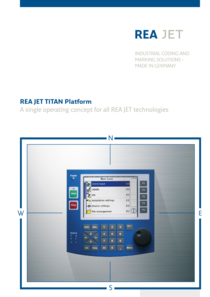
The REA JET TITAN Platform is a universal operating concept for all REA JET coding and marking technologies.

The most important answers to help you get started. We'll work with you to clarify the details of your application.
-
TITAN is the common operating platform, and the controller is the hardware for your specific application. So you’re not choosing between TITAN and a controller—you’re choosing a TITAN-based operating and integration concept.
-
The TITAN 2.0 WebGUI is installed on the controller and is accessed via a web browser. The operator terminal has to be on the same network or within the same IP address range. An existing machine HMI may be suitable as an operator terminal; its suitability has to be verified on a project-by-project basis.
-
These designations indicate two, four, or six active print head ports. Depending on the technology, individual print heads or head strings are connected to these ports. According to the product documentation, it is not possible to switch to a different variant at a later date. Therefore, be sure to take any planned expansions into account when making your selection.
-
Yes, HR 2.0, HR-NX, DOD 2.0, UP, GK 2.0, and ST. Support, capacity, and additional features depend on the technology and firmware. Cross-technology support does not mean that simultaneous mixed operation of different technologies is permitted.
-
The product documentation limits the temperature inside the control cabinet to 40 °C and recommends vertical installation. A lateral clearance of 50 mm between the aluminum base plate and other components is required, as well as a minimum clearance of 150 mm above the top of the control cabinet. The approved installation documentation is authoritative for the design.
-
Yes. The non-branded version does not include REA stickers or markings on the device, nor does it feature REA logos in the operating software. We will coordinate the appropriate order option with your integration plan.